
Amazon Associates Program Disclosure
As an Amazon Associate, Kazazone earns from qualifying purchases.
You bought a PS5 Pro. You spent 3,299 SAR on it. And you’re playing it on the same 60Hz TV your dad bought in 2017. Your cousin keeps telling you about his 165Hz monitor and how everything “feels different”. The group chat keeps sending you 1440p vs 4K comparison videos. Meanwhile the sales guy at Jarir swears the 3,000-riyal ultrawide is what you need.
So — what do you actually need? The real answer is way cheaper than anyone’s telling you.
Gaming Monitor Buying Guide KSA 2026 — From 549 SAR Entry to 1,099 SAR Sweet Spot
Let’s be real for a second. The monitor you game on matters more than your GPU, your mouse, or your chair — it’s literally where all the gaming happens. But the gaming monitor market in KSA is a minefield of marketing numbers. 4K! OLED! 360Hz! HDR1000! Most of these are either irrelevant to your actual hardware or a solution to a problem you don’t have. This guide covers three monitors that genuinely earn their price tags in Saudi Arabia in 2026 — a 549 SAR budget board that’s better than its price suggests, the mid-tier QHD standard every setup should have, and the premium IPS that ends the “should I spend more” question for good. Full stop.
If your PC has an RTX 3060 or lower, or you’re on a PS5 base model, buy the ASUS TUF VG247Q1A and stop reading. If you have an RTX 4060+/PS5 Pro and a decent desk, the LG 27GP850-B is the correct 1440p/165Hz sweet spot and the last monitor most KSA gamers ever need. The Samsung Odyssey G5 sits in the middle — great VA contrast for dark games, but only buy it on sale under 800 SAR. Wallah, the math works out.
Head-to-head spec sheet
| Spec | ASUS TUF VG247Q1A | Samsung Odyssey G5 | LG 27GP850-B |
| Panel type | VA | VA (high contrast) | Nano IPS |
| Size & resolution | 24" / 1080p | 27" / 1440p QHD | 27" / 1440p QHD |
| Refresh rate | 165 Hz | 144 Hz | 165 Hz (OC 180) |
| Response time | 1 ms MPRT | 1 ms MPRT | 1 ms GtG (real) |
| HDR | None (fake HDR10 label) | HDR10 | VESA DisplayHDR 400 |
| Sync | FreeSync Premium | FreeSync + G-Sync Compatible | FreeSync Premium + G-Sync Compatible |
| SAR price | 549 | 849 | 1,099 |
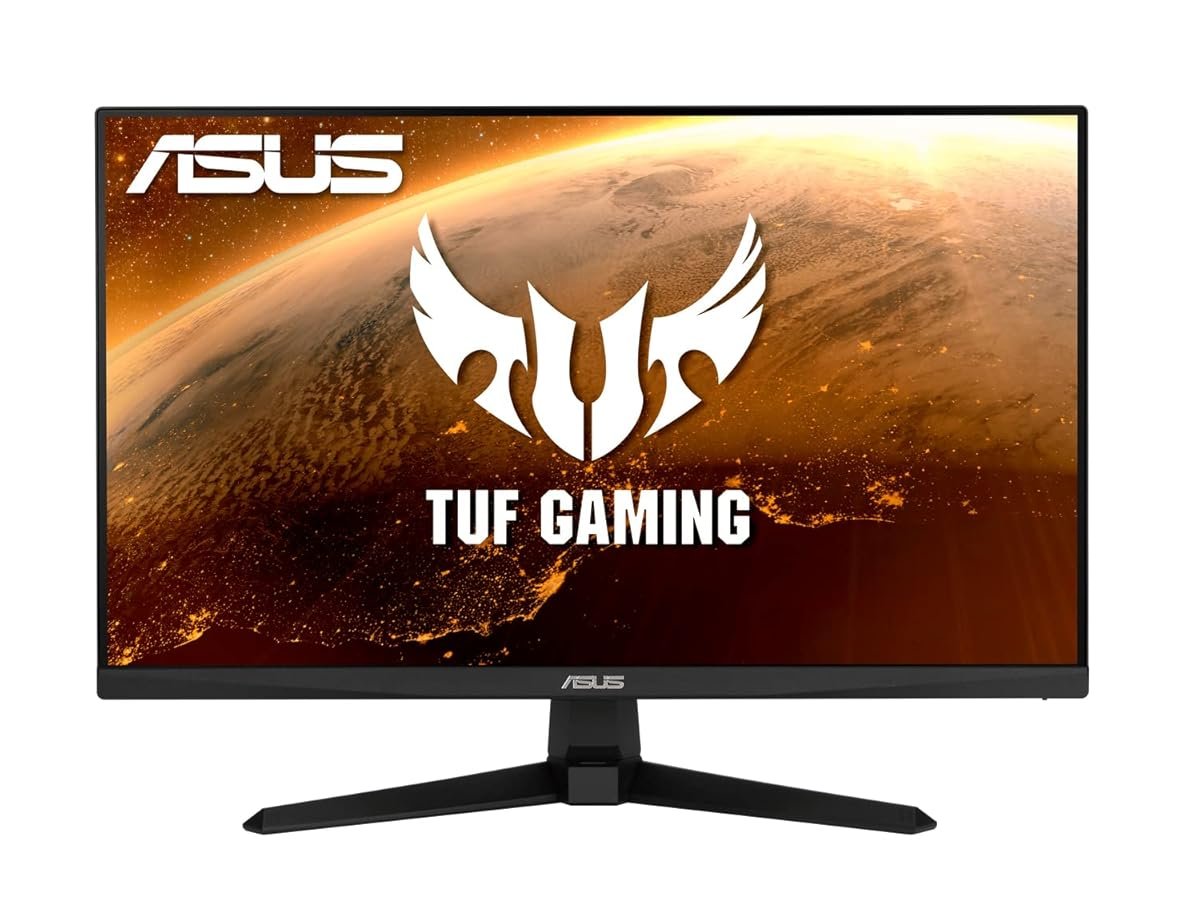
ASUS TUF Gaming VG247Q1A
The 24-inch entry ticket — and the correct pick if your GPU can’t push 1440p anyway.
Let’s talk about what 549 SAR actually gets you in 2026. The TUF VG247Q1A is a 24-inch 1080p panel running at 165Hz with a 1ms response time — exactly the spec sheet every competitive esports player argues for. The VA panel gives you deeper blacks than the cheap IPS monitors at this price, and the 165Hz refresh rate genuinely matters in Valorant, CS2, and Warzone. ASUS threw in adaptive sync (FreeSync Premium, also works as G-Sync Compatible on Nvidia), which eliminates screen tearing without the 400 SAR Nvidia module tax.
Here’s the honest argument for this monitor: if your PC has an RTX 3060, GTX 1660, or you’re hooked up to a PS5 base model, you cannot consistently push 1440p at high framerates. 1080p is your actual resolution ceiling, and the 24-inch size is ideal for low-DPI FPS play — pros in Gamers8 arenas use 24-inch 1080p panels exactly because the smaller pixel pitch lets them flick targets faster. Paying more for 1440p when your GPU can’t render it is burning riyals. Wallah, the math is straightforward.
Where it falls short is on the color and HDR claims. The “HDR10” label on the box is marketing fiction — the panel doesn’t have the brightness (only 250 nits) to do HDR meaningfully. Colors are 72% NTSC sRGB, which is fine for gaming but noticeably dull if you also do photo editing or watch Netflix content mastered for wide-gamut displays. The stand is also plastic and only tilts — no height adjustment, no pivot. Factor in a 50 SAR desk riser if you’re taller than 175cm.
- 165Hz for competitive FPS at this price is rare
- VA panel = deeper blacks than cheap IPS
- Adaptive sync with both FreeSync and G-Sync
- “HDR” claim is misleading marketing
- Basic tilt-only stand, no height adjust
- Colors limited at 72% NTSC — not for content creators
| Panel | 24" VA / 1080p |
| Refresh / response | 165 Hz / 1 ms MPRT |
| Ports | 2×HDMI 1.4, 1×DisplayPort 1.2 |
| Warranty | 3 years (ASUS KSA) |
You play mostly competitive FPS/MOBA, your GPU is an RTX 3060 or below, you’re on a PS5 base model, or this is your second monitor for a streaming setup. Also the correct pick for a teenage brother whose first real gaming PC is being built on a budget.
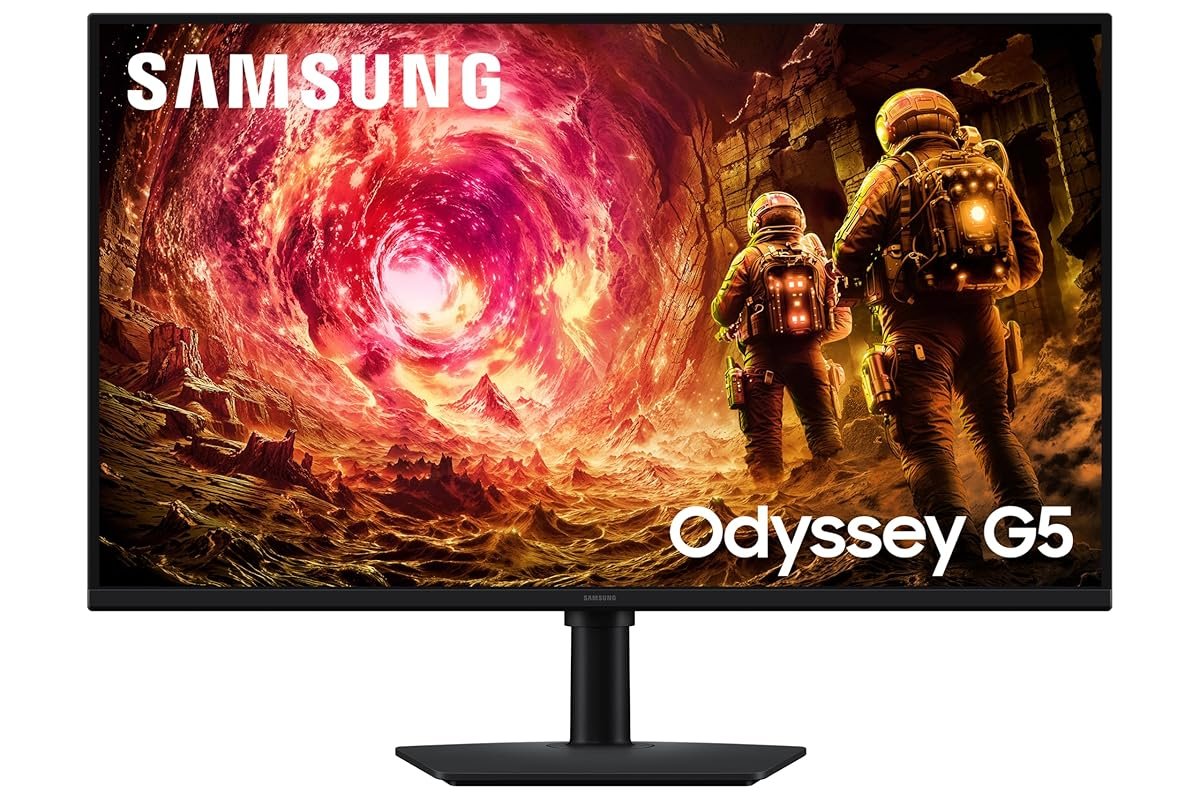
Samsung Odyssey G5 27”
The VA panel champion for dark, cinematic single-player games — less ideal for ranked FPS.
The Odyssey G5 is Samsung’s attempt at a “good enough” 1440p gaming monitor without touching the premium Odyssey Neo series that starts at 2,500+ SAR. What you get is a 27-inch curved VA panel (1000R curve — genuinely noticeable, not a marketing gimmick), 144Hz refresh, and the best black levels at this price point. For games like Tarkov, Hellblade 2, and Silent Hill 2 Remake, the VA panel’s 3000:1 contrast is visibly better than IPS alternatives. Ya salam, the dark-game immersion is real.
The real strength in KSA specifically is Samsung’s service network. Samsung Saudi Arabia has service centers in every major city, and a broken monitor can be replaced or repaired in 7-10 days — genuinely faster than almost any other brand here. The 3-year warranty is also honored without arguments, which matters when you’re dropping nearly 900 riyals. If you’ve had warranty headaches with other tech brands in the past, this is a real factor.
Where it falls short: motion clarity. VA panels have slower pixel transitions than IPS, which means in competitive FPS games you’ll see more ghosting behind fast-moving enemies. Samsung markets a “1ms MPRT” response time but that’s the marketing spec; real-world GtG (gray-to-gray) is around 4-5ms. If you’re a ranked Apex or Valorant player, this is a genuine downside — you’ll notice it. Casual gamers won’t. The panel also has worse viewing angles than the LG, meaning if you share the monitor with a partner for Netflix, the edges wash out from off-angle seating.
- Best contrast (3000:1) at this price
- Samsung KSA warranty is genuinely fast
- 1000R curve adds real immersion for single-player
- Real-world response time slower than spec suggests
- Ghosting visible in competitive FPS
- Weak off-angle viewing — bad for couch sharing
| Panel | 27" curved VA / 1440p QHD |
| Refresh / response | 144 Hz / 1 ms MPRT (4-5 ms GtG) |
| Ports | 1×HDMI 2.0, 1×DisplayPort 1.2 |
| Warranty | 3 years (Samsung KSA) |
You play mostly single-player or co-op games (story-driven RPGs, open-world, horror), you value great warranty support over motion clarity, and you can catch it on sale under 800 SAR. Not ideal if your main games are Valorant, CS2, or Apex Legends.
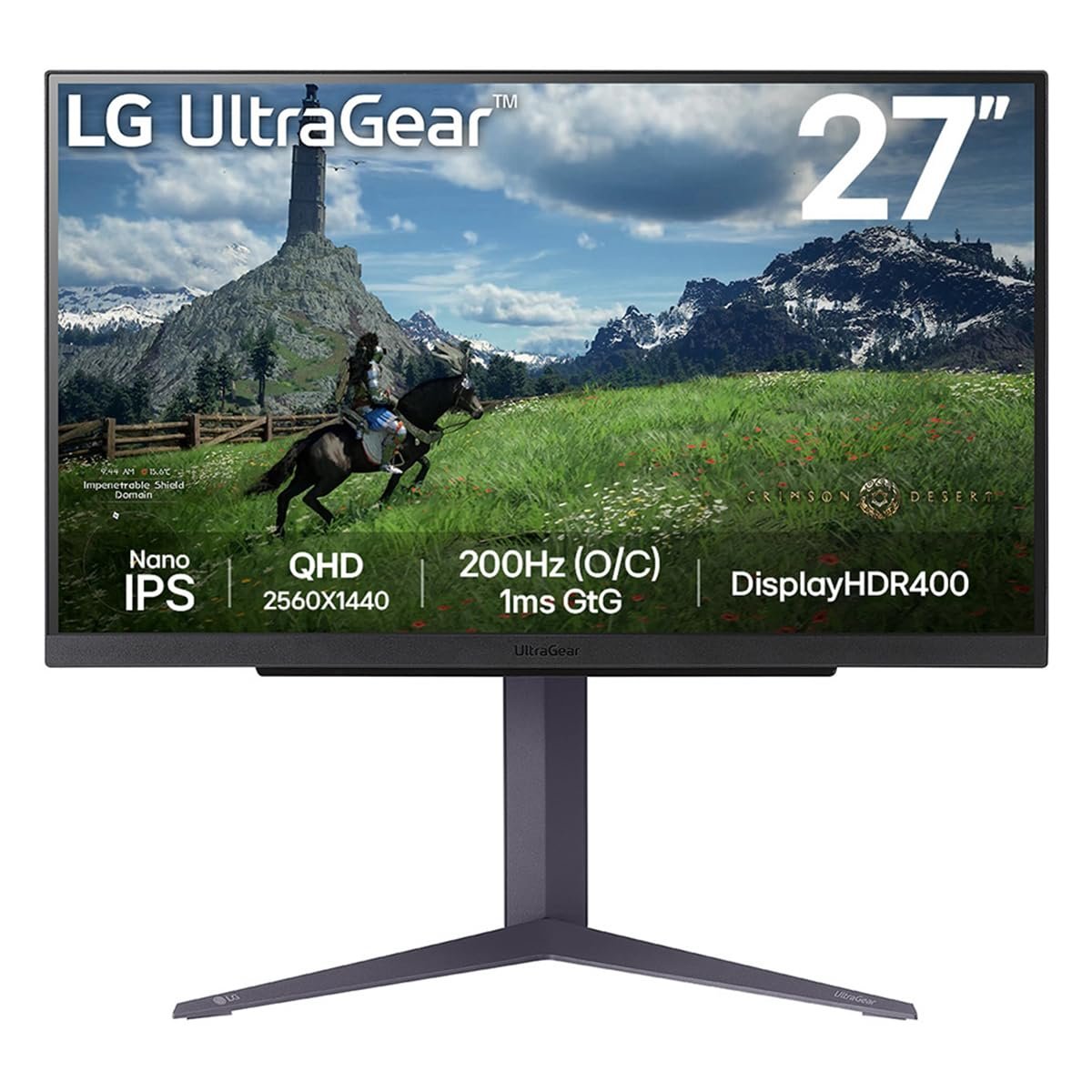
LG UltraGear 27GP850-B
The sweet-spot monitor that ends most KSA gamers’ upgrade path — Nano IPS, real HDR, no compromises.
Here’s why the 27GP850-B has quietly become the “default” recommendation in every serious PC gaming forum worldwide: LG used Nano IPS panel technology here instead of the cheap VA shortcut most 1,000-SAR monitors take. The real-world difference is 1ms GtG response time (actually, not marketing-1ms), 98% DCI-P3 color coverage, and viewing angles that don’t change from any seating position. It’s the first monitor on this list where the specs on the box match what you experience when you sit down.
For KSA gamers specifically, the LG handles our summer use case better than both alternatives. Nano IPS runs cooler than VA under load, which matters when your room AC is cycling on and off during July afternoons and your monitor’s been on for 6 hours. Content creation also gets real here — if you edit YouTube videos, do color work, or stream gameplay that needs color accuracy, the 98% DCI-P3 coverage is genuinely professional-grade. This is the monitor you buy once and keep for five years. Ya salam, it’s worth the 250 SAR premium.
Honest downsides: no built-in speakers (none of these three have good speakers, but the LG doesn’t even bother trying), and the VESA DisplayHDR 400 certification is real HDR but still not the peak-brightness experience you get from an OLED or HDR 1000 monitor. If you’re coming from a high-end TV, the HDR here will feel mild. The stand is great — full ergonomic adjustment including pivot for portrait mode — but it’s a large footprint that may not fit a small Jeddah apartment desk. Measure first.
- Real 1ms GtG Nano IPS — fastest at this price
- 98% DCI-P3 — color-accurate for content work
- Full ergonomic stand including pivot
- No built-in speakers (not that you’d use them)
- HDR 400 is real but modest
- Big stand footprint — measure your desk
| Panel | 27" Nano IPS / 1440p QHD |
| Refresh / response | 165 Hz (180 Hz OC) / 1 ms GtG |
| Ports | 2×HDMI 2.0, 1×DisplayPort 1.4 |
| Warranty | 2 years (LG KSA) |
You have an RTX 4060 or better (or PS5 Pro), you play a mix of competitive and single-player games, you do any kind of content creation, or you want to buy one monitor and not think about it for five years. Also the right choice if you’re setting up a serious home office that doubles as a gaming rig.
Hidden Costs Nobody Mentions
- A proper DisplayPort cable — 50-120 SAR. The stock cable in the box is enough for 144Hz at 1080p. For 165Hz at 1440p on the LG or Samsung, you actually need DisplayPort 1.4 certified — the cheap cable will cause flickering and signal drops that you’ll blame on the monitor for weeks before figuring it out.
- A monitor arm (eventually) — 180-350 SAR. The stock stands all eat desk space. A VESA arm frees up 40cm of depth and dramatically improves posture. North Bayou F80 is the KSA gamer’s favorite at around 180 SAR on Amazon.sa and good enough for any of these monitors.
- Speakers or headphones budget — 200-600 SAR. None of these monitors have usable built-in speakers. If you’re not already headset-only, budget for desktop speakers. A pair of Creative Pebble V3 at 199 SAR is the minimum viable answer.
- HDMI 2.1 cable for PS5 Pro — 80-150 SAR. If you’re running a PS5 Pro to any of these monitors and want the full 4K/120Hz (Samsung and LG both support it), you need a certified HDMI 2.1 cable. The cheap ones cap out at 1440p/60Hz and kill the whole point.
- Desk upgrade (often) — 400-1,500 SAR. A 27-inch monitor won’t fit comfortably on a small desk meant for a laptop. Expect to upgrade to at least a 120cm-wide desk if you’re not already there. IKEA’s Linnmon at 270 SAR handles it.
So which one do you buy?
- GPU is RTX 3060 or below
- Competitive FPS focused
- PS5 base model, not Pro
- Story/single-player gaming
- Value Samsung service network
- On sale under 800 SAR
- RTX 4060+ or PS5 Pro
- Content creation + gaming
- Want a 5-year monitor
Things Saudi Gamers Should Know Before Buying
Amazon.sa vs noon vs Jarir vs Extra — For monitors specifically, Extra and Jarir have physical display units worth visiting before you buy — looking at a 27-inch monitor in person completely changes your sense of scale. Amazon.sa is typically 100-200 SAR cheaper than retail on all three models. noon occasionally runs flash sales on the LG that drop it below 1,000 SAR — those are the buying moments. Haraj has decent monitor resale but backlight issues aren’t visible in inspection photos; avoid used unless you can physically test.
Saudi summer and monitor lifespan — Gaming monitors run warm, and if yours is in a room without direct AC during Saudi summer afternoons, you’re looking at 40-45°C ambient temps pushing the electronics hard. This doesn’t kill monitors outright, but it shortens backlight life by 20-30% according to manufacturer data. If you can, keep your monitor out of direct sunlight and turn it off during 3-hour AC-off gaps instead of leaving it on sleep.
Dead pixel policies vary wildly — ASUS KSA replaces monitors with even one dead pixel under their zero-bright-pixel policy within the first 30 days. Samsung requires 3+ dead pixels to approve a replacement. LG is somewhere in the middle — 2 dead pixels in a specific zone. Always inspect your monitor within the first week of delivery and test with full-color screens (online tools work). Document any dead pixels with photos timestamped before the return window closes.
PS5 Pro / Xbox Series X compatibility — All three of these monitors accept HDMI signals from PS5 and Xbox Series X. Only the Samsung and LG support 1440p on PS5 Pro (the base PS5 can’t output 1440p at all — it outputs 1080p or 4K with no middle option). Xbox Series X supports 1440p natively on all three. If you’re consoling on the ASUS 1080p, you’re leaving performance on the table with both consoles.
Installment options — All three monitors support Tabby and Tamara installments via Amazon.sa. The LG at 1,099 SAR comes out to 4 payments of ~275 SAR, which is what makes it actually accessible to students and entry-level workers. Jarir also runs its own in-store installment program on monitor purchases over 500 SAR. Mada, STC Pay, and Apple Pay all work.
Frequently Asked Questions
For 95% of gamers, 144Hz is the sweet spot. The jump from 60Hz to 144Hz is genuinely transformative — you’ll notice it in every game. The jump from 144Hz to 240Hz is only visible to trained eyes in fast-motion competitive games, and requires your GPU to actually hit 240+fps consistently, which most mid-tier hardware can’t. Unless you’re a ranked esports player competing in tournaments, 144-165Hz is the right target.
Match resolution to your GPU. RTX 3060 or below: stick to 1080p. RTX 4060 to RTX 4070 Super: 1440p is the sweet spot. RTX 4080 or 4090 (and PS5 Pro): 4K is finally realistic, but you pay a massive premium for 4K monitors with good refresh rates. For KSA budgets in 2026, 1440p at 144-165Hz is where the value lives.
IPS: best color accuracy and viewing angles, slightly worse contrast. VA: deeper blacks and better contrast, slower pixel response. OLED: best of everything but risk of burn-in with static HUDs and 2-3× the price. For gaming in KSA specifically, Nano IPS (like the LG) is the correct answer for most people — durable, fast, color-accurate. Leave OLED alone until prices drop and burn-in concerns improve.
FreeSync is enough — and all three of these monitors support it. The “G-Sync Compatible” label on the Samsung and LG means your Nvidia GPU will get the same tear-free experience without paying the Nvidia module tax. True G-Sync Ultimate monitors cost 400-600 SAR more for benefits almost no one can see. Save the money.
A well-built IPS or VA gaming monitor lasts 7-10 years of daily use in typical air-conditioned Saudi homes. Backlight LEDs slowly dim over time (you’ll lose about 10-15% brightness over 5 years), and the cheaper the monitor, the faster this happens. The biggest killers are direct sunlight from windows and leaving the monitor on 24/7. Turn it off at night — you’ll double its useful lifespan.
Ultrawide monitors are immersive for single-player games but create real problems in competitive FPS (narrow vertical field, distorted periphery) and break a lot of esports titles entirely. The price premium in KSA is also high — a decent 34-inch ultrawide starts at 2,000+ SAR. For the same money you could buy the LG 27GP850-B and a second 24-inch monitor for productivity, which is almost always the better setup.
As an Amazon Associate, Kazazone earns from qualifying purchases. When you buy through our links, we may earn a small commission at no extra cost to you. This helps us keep creating honest, independent reviews for Saudi gamers.



2 Responses