
Amazon Associates Program Disclosure
As an Amazon Associate, Kazazone earns from qualifying purchases.
It’s a Thursday night in Jeddah. Your cousin just dropped 2,400 SAR on a keyboard that glows like a spaceship, and your group chat is now demanding you match him. Meanwhile, your 149-riyal Redragon has been clicking away for three years without a single dead key.
So — do you actually need to spend more? Let’s settle this.
Gaming Keyboard Buying Guide KSA 2026 — Honest Picks from Budget to Premium
Here’s the truth nobody in the YouTube comments will tell you: for 90% of KSA gamers, a 150-riyal mechanical keyboard is already the point of diminishing returns. The upgrade from membrane to mechanical? Massive. The jump from a decent mechanical to a 900-riyal optical flagship? Real, but narrow. This guide picks three keyboards that cover every serious use case in Saudi Arabia in 2026 — no fluff, no sponsored ranking games, and yes, we’ll tell you when the cheap one is genuinely the right answer.
If you’re new to mechanical keyboards, buy the Redragon K552 and stop reading. If you play competitive FPS or stream three nights a week, the Logitech G Pro X TKL is the sane money. The Razer Huntsman V2 is for gamers who already know why they want optical switches — and can justify 899 SAR. Full stop.
Head-to-head spec sheet
| Spec | Redragon K552 | Logitech G Pro X TKL | Razer Huntsman V2 |
| Switch type | Blue mechanical | Hot-swap mechanical | Optical linear/clicky |
| Layout | TKL (87 keys) | TKL (87 keys) | Full-size + media |
| Build material | Plastic + metal plate | Aluminum top | Full aluminum |
| Keycaps | ABS (replaceable) | PBT double-shot | Doubleshot PBT |
| Connection | Wired USB | Wired detachable USB-C | Wired USB-C |
| SAR price | 149 | 699 | 899 |
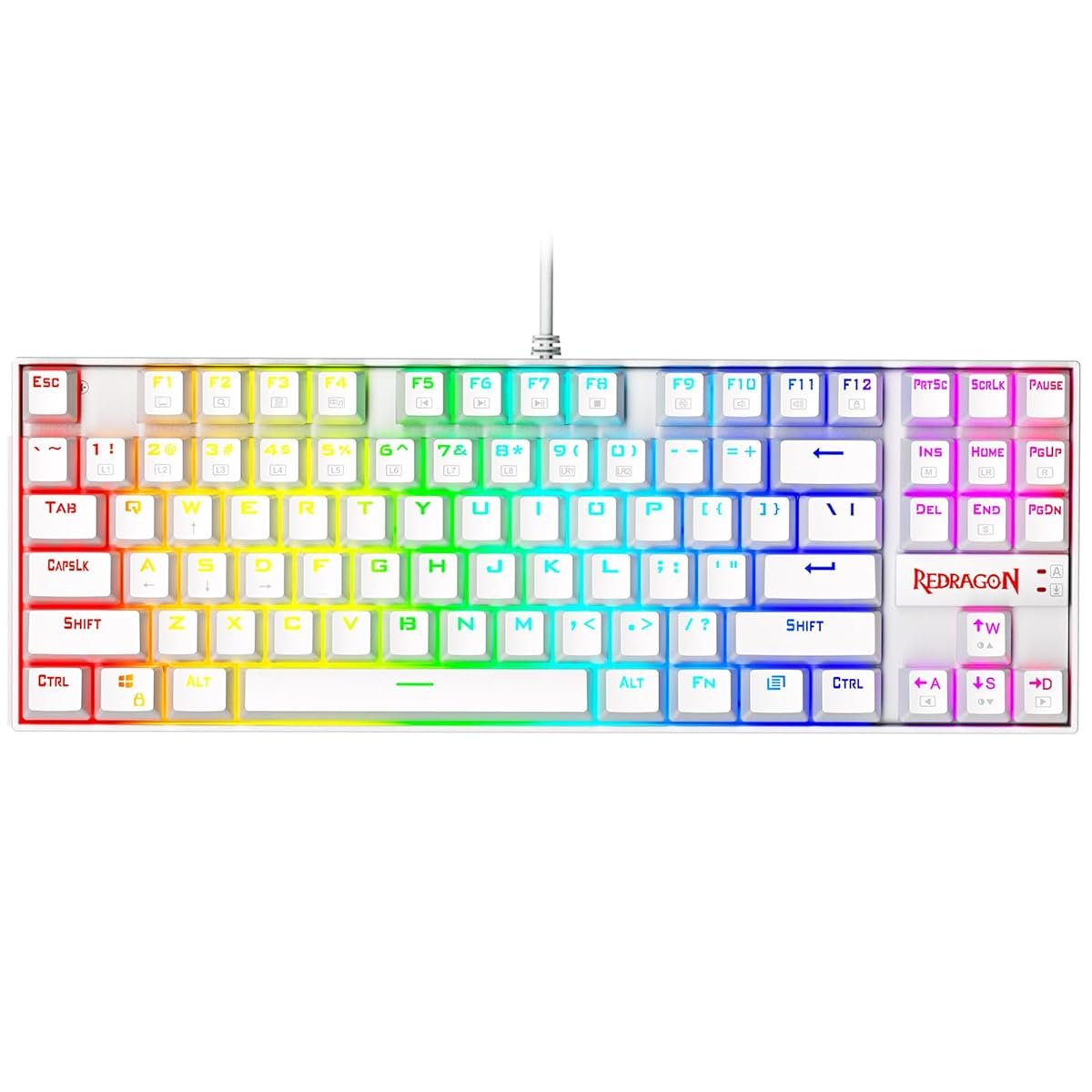
Redragon K552 Kumara
The keyboard that made half of KSA’s Discord servers mechanical overnight.
Let’s be real for a second. If you’ve never typed on a mechanical keyboard before, plugging a K552 into your PC will feel like swapping your Corolla for an old Lexus — everything suddenly has weight. The blue switches are loud, the action is crisp, and after your first CS2 session you’ll wonder why you waited.
This keyboard has quietly become the unofficial starter board of the KSA PC gaming scene. Walk into any cyber café in Olaya or Tahlia and you’ll see a row of these lit up in red. The reason is embarrassingly simple: for the price of a nice shawarma meal for four, you get a real metal backplate, N-key rollover, and switches rated for 50 million presses. Wallah, the math isn’t even close.
What it skips is software. No macros, no layer remapping, no cloud sync. The RGB cycles through a dozen preset modes and that’s it. For a 19-year-old playing Valorant three hours a night, none of that matters. For a streamer who wants per-key lighting tied to their overlay — yeah, you’ll outgrow this in six months.
- Best mechanical feel under 200 SAR, period
- Metal backplate survives abuse
- Replaceable keycaps — upgrade later
- Loud blue switches — not for late nights in shared rooms
- No software, no macro remapping
- ABS keycaps will shine after a year
| Switch | Outemu Blue (clicky) |
| Layout | TKL / 87 keys |
| Lighting | Red / Rainbow backlit |
| Weight | 950g |
You’re going mechanical for the first time, your room isn’t shared with someone trying to sleep, and you’d rather spend the savings on a better mouse or a Game Pass subscription. Also the obvious pick if you’re setting up a second PC for the kids.
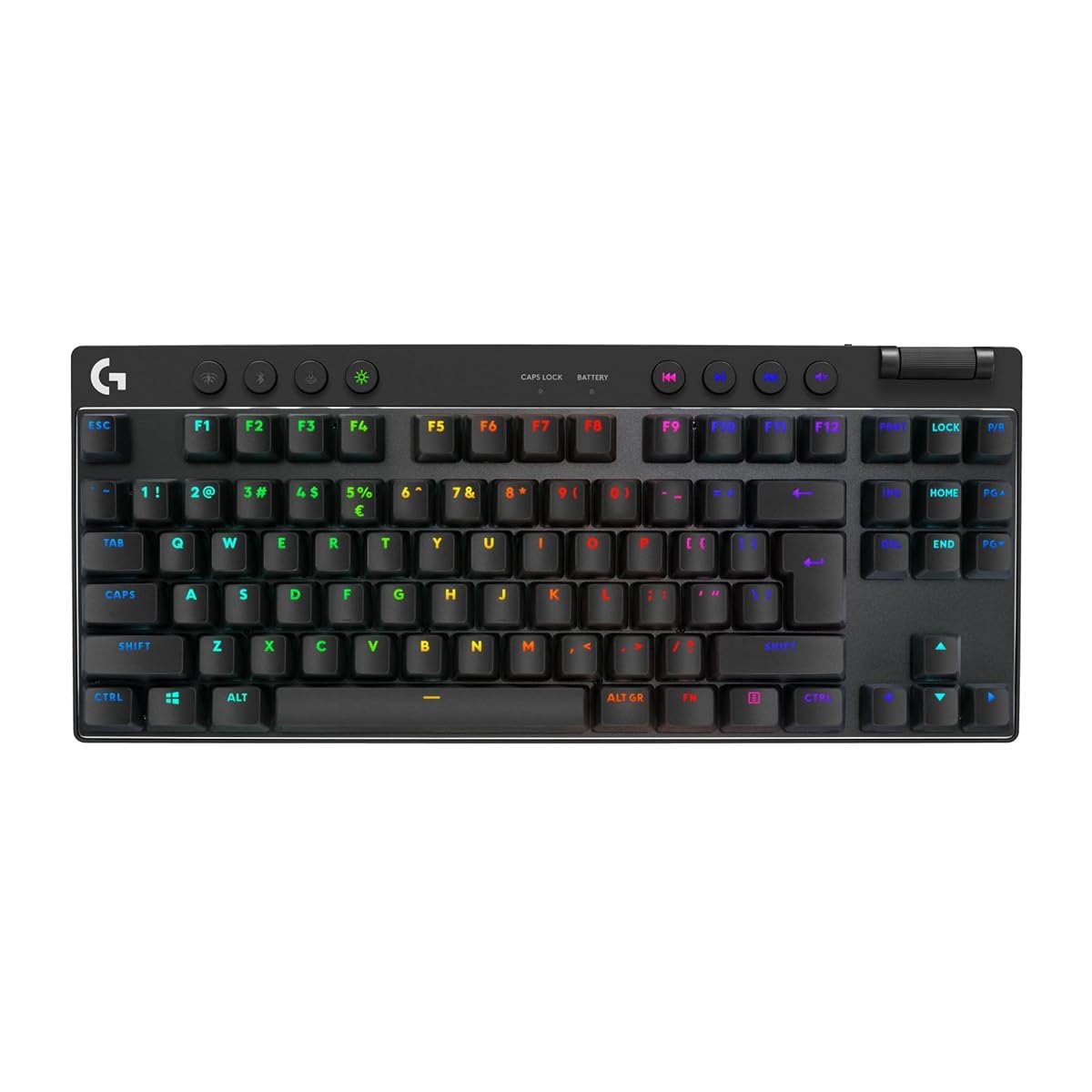
Logitech G Pro X TKL
The esports workhorse — and honestly, the last keyboard most KSA gamers ever need.
This is the board pro players in Riyadh’s Gamers8 arenas are actually using. Not because of marketing — because it gets everything right and gets out of the way. The hot-swappable switches mean you can start with clicky blues, swap to linear reds when you get serious about FPS, and never buy another keyboard. Ya salam, that’s value.
The TKL layout is the smartest choice Logitech made. Removing the numpad pulls your mouse hand closer to your body, which matters when you’re holding 90-degree angles in Valorant for three hours straight. The aluminum top plate doesn’t flex when you slam Shift during a clutch moment, and the detachable USB-C cable means when you travel to a LAN café in Jeddah, the board comes with you without a tangled mess in your bag.
Where it stumbles: the G Hub software is genuinely annoying. It pushes updates you didn’t ask for, logs you out randomly, and if you’re on a Saudi ISP with occasional latency to Logitech’s EU servers, syncing profiles takes 30 seconds longer than it should. Minor gripe, but you’ll meet it every week.
- Hot-swap switches — upgrade the feel, keep the board
- PBT keycaps survive Saudi summer desk temps
- TKL = more mouse room for low-DPI players
- G Hub software is a daily low-grade annoyance
- No wireless at this price — the Pro X is pricier still
- No wrist rest included
| Switch | GX (hot-swap, your choice) |
| Layout | TKL / 87 keys |
| Lighting | Per-key RGB LIGHTSYNC |
| Weight | 1,120g |
You play competitive FPS more than 10 hours a week, you’re streaming on Twitch or Kick, or you type for work during the day and game at night. Also the right pick if you’ve owned three cheap keyboards in two years and you’re tired of it.
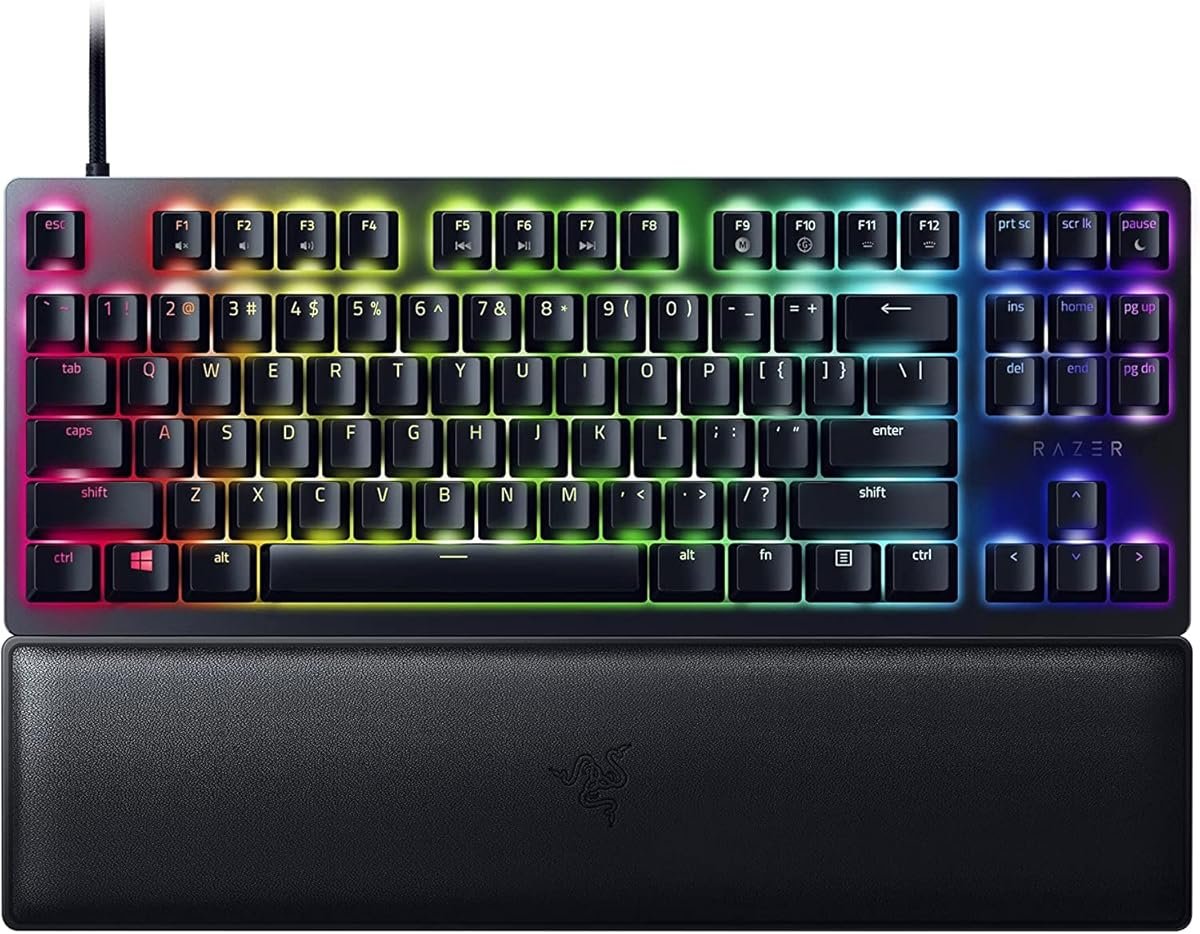
Razer Huntsman V2
Optical switches, sound-dampened, full-size — the flex keyboard with real performance behind it.
Razer’s optical switches register the moment a beam of light breaks inside the switch — no physical metal contact. That means zero debounce delay and, wallah, a keypress that lands on-screen about 30 microseconds faster than a traditional mechanical. Can you feel the difference in Apex? Only if you’re already a top-500 player. But the keyboard is built like a tank and sounds like a soft thwock instead of a clatter, which your ribs-sharing-a-room sibling will thank you for.
The full-size layout comes with dedicated media keys and a chunky volume wheel — genuinely useful when you’re juggling a Twitch stream, Discord, and Spotify at the same time. Razer also throws in a padded leatherette wrist rest, which at 899 SAR you kind of expect, but the Logitech doesn’t include one, so credit where it’s due.
The real reason to skip this: Synapse. Razer’s software is the heaviest in the industry, eats 300MB of RAM, and insists on running at startup. If you’re on a 16GB gaming rig trying to squeeze every frame out of Tarkov, that’s a real cost. Also the full-size layout takes up more desk space — if your setup is a 100cm IKEA desk in a compact Jeddah apartment, the TKL Logitech may actually fit better.
- Optical switches — fastest actuation you can buy
- Sound-dampened — quietest mechanical-feel option
- Wrist rest included, doubleshot PBT keycaps
- Synapse software is a resource hog
- Full-size = less mouse room on small desks
- The speed advantage is invisible to most players
| Switch | Razer Optical (linear or clicky) |
| Layout | Full-size / 104 keys + media |
| Lighting | Per-key Chroma RGB |
| Weight | 1,360g (with rest) |
You’re already deep in the Razer ecosystem, you type late at night and genuinely need quiet switches, or you’re building an RGB showcase setup for content. Also the right pick if you’ve already owned a Logitech or Corsair and want to try something different.
Hidden Costs Nobody Mentions
- A proper wrist rest — 80-150 SAR. The Logitech doesn’t include one, and after 4 hours of Warzone your wrist will tell you exactly why you need it.
- A USB-C cable replacement (eventually) — 45 SAR. The stock cables on all three are braided but they’re not immortal. Keep a spare if you travel to LAN cafés.
- Keycap puller + spare switches (if hot-swap) — 60-120 SAR. Not strictly needed, but once you try Gateron Yellows you’re never going back.
- A desk mat — 70-200 SAR. Your old mouse pad isn’t big enough for a TKL plus a wireless mouse plus a drink. Trust us.
- Electricity for RGB — free, but Saudi summer AC already runs 12 hours a day. Turning off the RGB when you’re not gaming saves 3-5 SAR/month on your SEC bill. Compound it over a year and that’s a month of Game Pass.
So which one do you buy?
- First mechanical, any budget
- Casual gaming under 10 hrs/week
- Backup or second-PC board
- Competitive FPS / MOBA player
- Stream or create content
- Want one board for 5+ years
- Razer ecosystem already
- Need quiet + full-size
- RGB setup showcase
Things Saudi Gamers Should Know Before Buying
Saudi summer and keyboards — The issue isn’t heat damaging the switches (they’re fine). It’s ABS keycaps getting shiny and greasy faster when your hands are warmer. PBT keycaps, like what the Logitech and Razer use, will look new two years longer. If you go with the K552, expect to replace keycaps after year one.
Amazon.sa vs noon vs Jarir — For keyboards specifically, Amazon.sa is almost always cheapest on these three models. Jarir carries the Logitech and Razer in physical stores — useful if you want to feel the switches before buying. noon occasionally has the K552 below 130 SAR during sales. The Haraj resale market is terrible for keyboards — you lose 50% of the retail price the moment you open the box.
Warranty reality — Logitech and Razer both honor their 2-year warranty through regional partners in KSA — but processing takes 3-6 weeks. Redragon has a 1-year warranty that’s technically valid, practically useless. At 149 SAR, if it dies you just buy another one. For the premium boards, keep your Amazon invoice in your email forever.
Arabic keycaps — None of these three come with Arabic legends out of the box in KSA. If you want Arabic keys, you’ll need to either buy laser-engraved stickers (40 SAR on noon), get custom PBT Arabic keycaps shipped from GMK or similar (300-500 SAR, 4-week wait), or just learn the positions — which honestly most Saudi gamers already have.
Your Mada card will work — All three are Amazon.sa Prime-eligible, which means Mada, STC Pay, Apple Pay, and installment options through Tabby or Tamara on the higher-priced ones. Next-day delivery to Riyadh, Jeddah, Dammam, and most of the Eastern Province.
Frequently Asked Questions
For anyone playing FPS, MOBA, or fighting games — yes, clearly. The actuation consistency and key rollover alone change how you play. For someone who mostly plays story games or FIFA on controller, a membrane is fine. You’re not missing a competitive edge; you’re missing a tactile experience.
For pure gaming, linear reds or optical. For typing + gaming mix, tactile browns. For that satisfying clack and you don’t share a room with anyone, blues. If you can’t decide, browns are the safe middle ground nobody regrets.
Technically yes — all three are USB keyboards and both consoles will recognize them for menus and chat. But actual gaming support depends on the game. Call of Duty allows keyboard/mouse on console; most other shooters don’t. For PC-only gaming features like macros and per-key RGB, you’ll need to stay on PC.
Amazon.sa covers all three with standard delivery — but Prime 1-day only applies to Riyadh, Jeddah, Dammam, Khobar, and Mecca. For smaller cities expect 3-5 business days. noon has wider same-day zones in the Eastern Province if speed matters.
Probably not. Wireless mechanical keyboards add 200-400 SAR to the price for a feature you rarely use (keyboards don’t really move during gaming). Unless you’re using a couch gaming setup with an HTPC, a wired keyboard with a detachable USB-C cable is the smarter buy.
A well-built mechanical keyboard handles 4-6 years of daily use in a typical air-conditioned Saudi home. The failure points are usually the USB cable (replaceable if detachable) or individual switches (replaceable on hot-swap models). Budget boards like the K552 typically give 2-3 years of heavy use before a few keys start acting up.
As an Amazon Associate, Kazazone earns from qualifying purchases. When you buy through our links, we may earn a small commission at no extra cost to you. This helps us keep creating honest, independent reviews for Saudi gamers.



One Response