Amazon Associates Program Disclosure
As an Amazon Associate, Kazazone earns from qualifying purchases.
The moment you type on a proper mechanical keyboard, you feel it. It’s not marketing. It’s the way a tactile switch tells your finger exactly when the key has actuated, the way a good stabilizer makes the spacebar sound like a thump not a rattle, the way your hand stops getting tired after two hours of Dota.
But “mechanical keyboard” is a huge tent — it covers SAR 300 gaming boards and SAR 1,500 enthusiast builds that sound like rain on a tin roof. This guide is for the three you should actually consider in KSA in 2025, with the switches that matter, the layouts that make sense, and the real math on hot-swap. No paid shills. No Hall-effect tangents.
Best Mechanical Keyboards in Saudi Arabia 2025 — Switches, Feel, and Hot-Swap Tested
Picking a mechanical keyboard in Saudi Arabia in 2025 has gotten weirdly complicated. The US enthusiast scene exploded, custom builds hit the region, and brands like Keychron finally shipped proper Arabic-friendly layouts. Meanwhile Logitech and Razer keep iterating their esports-focused boards. This is the shortlist: three genuinely mechanical keyboards (no optical sleight of hand), tested on a daily driver desk through a Riyadh summer, covering the three real use cases — esports, hot-swap enthusiast, and premium daily driver.
Kazazone Verdict: For most Saudi gamers in 2025, the Keychron K8 Pro is the right answer — hot-swap means you can try different switches without buying a new board, and the TKL size fits any desk. If you’re deep in competitive FPS and want the most consistent tournament feel, the Logitech G Pro X TKL with GX switches earns the premium. And if you want a full-size board with a numpad, real clicky Green switches, and that desk-dominating presence, the Razer BlackWidow V4 Pro is the enthusiast’s full-size pick.
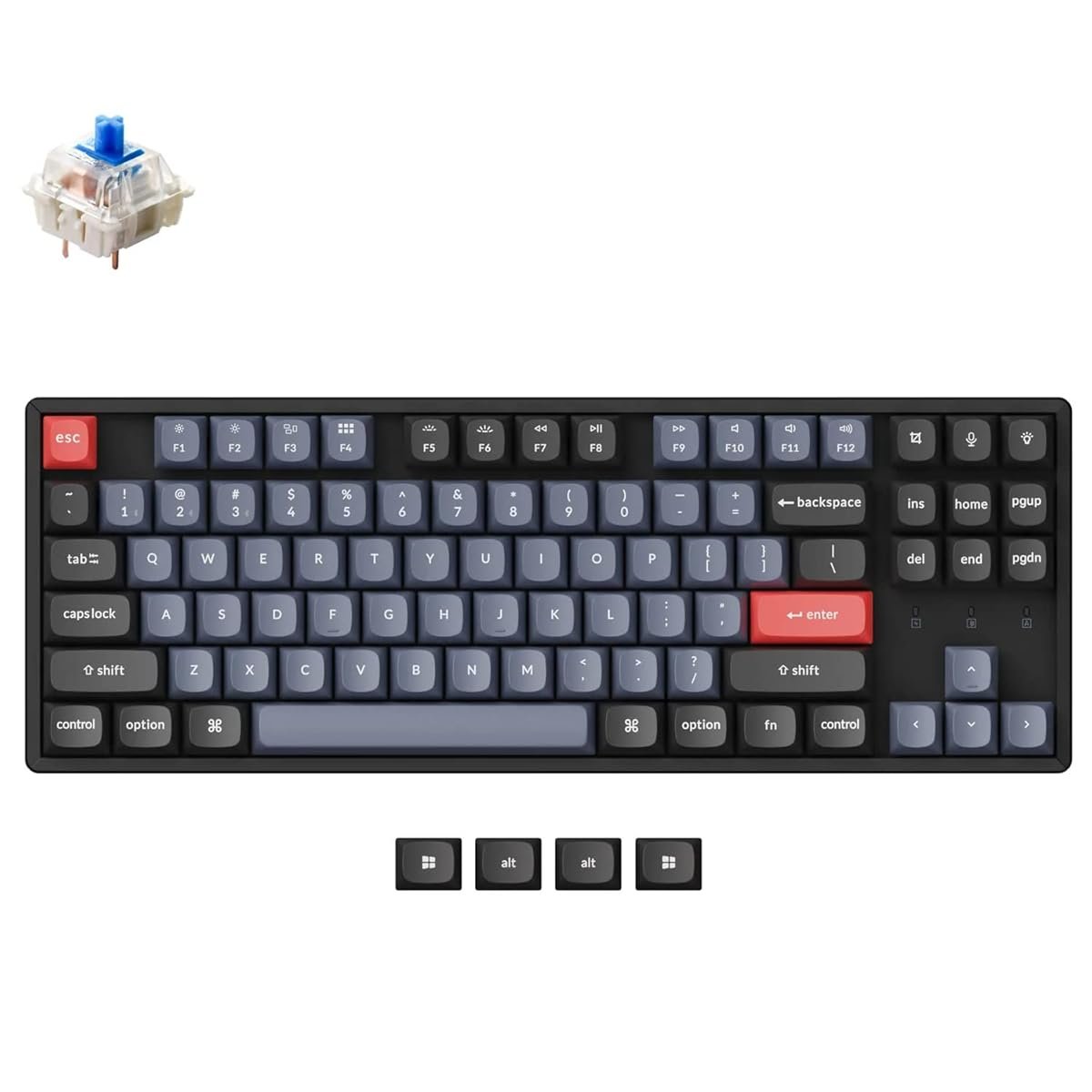
Keychron K8 Pro (Hot-Swap TKL)
The keyboard that lets you change your mind about switches without buying another keyboard.
4.7/5
(2,400+ global reviews)
Keychron basically rewrote the rules. The K8 Pro ships with Gateron G Pro switches — you pick Red (linear), Brown (tactile), or Blue (clicky) at checkout — but the real trick is the hot-swap socket. If you hate the feel after two weeks, you pop the keycap, pull the switch with a tool (included), and drop in a new one. Budget SAR 80–200 for a set of fresh switches from Amazon.sa or a regional custom-keeb shop, and you’ve got a different keyboard for a fraction of the price of a new one.
The TKL layout is the sweet spot for a desk in KSA where mouse movement matters — smaller than full-size, but you keep your F-row and arrow keys, unlike 60% boards. USB-C wired, Bluetooth 5.1 for up to three devices, and the battery lasts around 240 hours with RGB off, about 70 with it on. Honestly, with RGB off on most days, you charge this once a month.
What makes this the #1 pick for 2025: QMK/VIA support means you can remap every key without awful proprietary software. The doubleshot PBT keycaps don’t shine up after a Saudi summer of sweaty gaming sessions, the way cheap ABS caps do. And at SAR 499, you’re paying half what Logitech asks, getting double the customization.
- Hot-swap sockets — change switches anytime
- QMK/VIA remapping support
- PBT doubleshot keycaps (no shine)
- Bluetooth + wired, 3-device pairing
- No numpad (TKL)
- Polling rate 1,000 Hz max
- Factory stabilizers can rattle — may need lube
| Switch Type | Gateron G Pro (Red/Brown/Blue), hot-swap 3-pin/5-pin |
| Layout | TKL (87 keys) |
| Connection | USB-C + Bluetooth 5.1 (3 devices) |
| Keycaps | PBT doubleshot |
| Firmware | QMK/VIA compatible |
Right for you if: You’re curious about mechanical switches and don’t want to commit on day one, you value customization and open-source firmware, and you’re okay without a numpad. Also the best pick if you want one keyboard that works with your PC, Mac, and phone over Bluetooth.
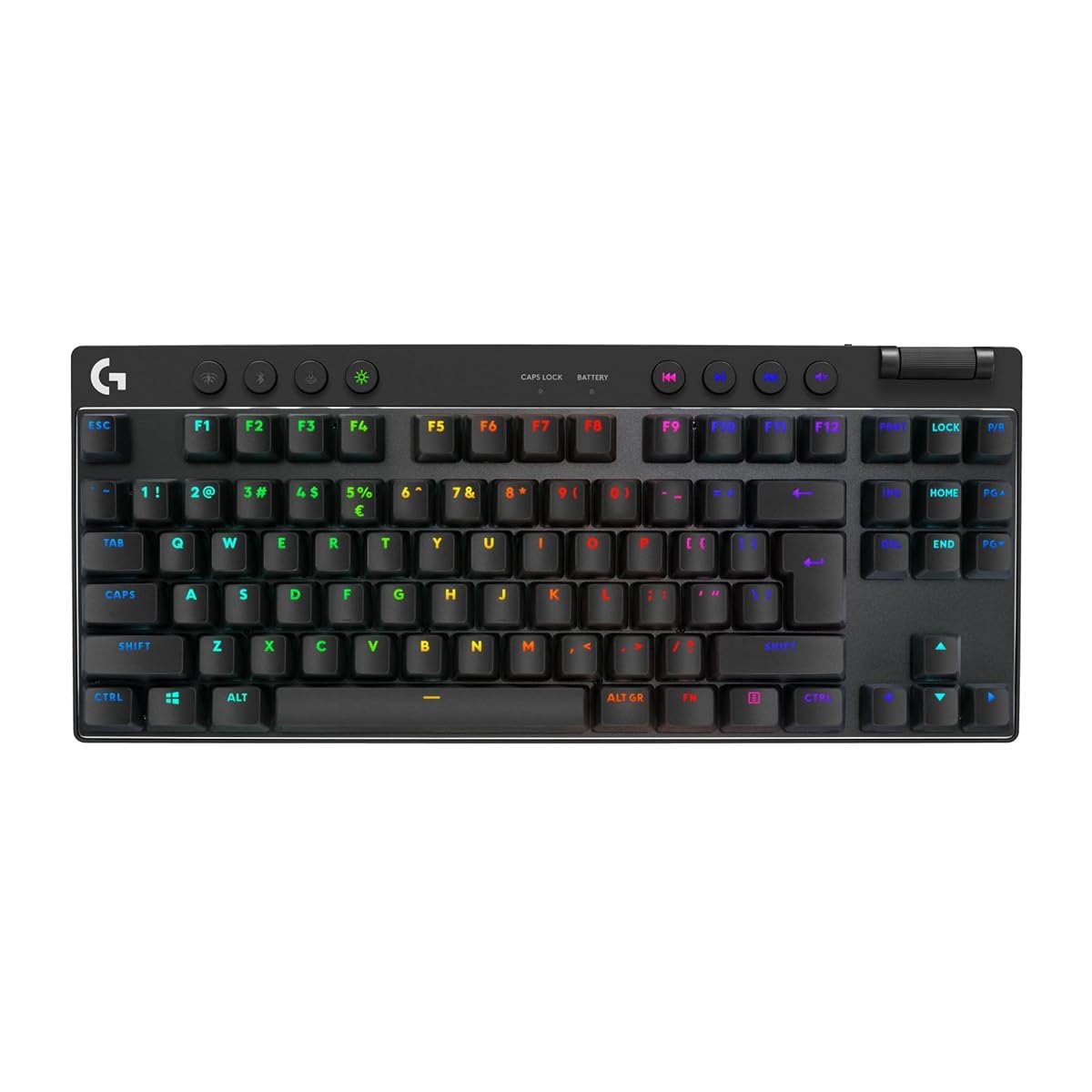
Logitech G Pro X TKL
The tournament board with swappable GX switches and zero-nonsense build.
4.6/5
(2,800+ global reviews)
Logitech’s G Pro X TKL is what you buy when you’ve decided you want a mechanical keyboard that will never let you down in a Valorant ranked match. GX Brown (tactile), GX Red (linear), or GX Blue (clicky) — pick your poison. Unlike the K8 Pro, these switches are specific to Logitech’s hot-swap housings, so you can’t drop in aftermarket Kailh Box Jade or Alpacas. But Logitech’s QC on its own switches is tighter than Keychron’s.
TKL form factor, detachable USB-C cable, and here’s the thing most reviews skip: 2,000 Hz polling rate for PC gaming. That’s twice the K8 Pro and means input registers in half a millisecond. In Counter-Strike or Valorant that’s the difference between the peek hitting first and you hitting the ground. Whether you can actually feel 2,000 Hz vs 1,000 Hz is debated — but if you’re at a level where you care, you care.
The trade-off: SAR 699, no Bluetooth, and the keycaps are ABS — they’ll shine up after a year of heavy use in KSA. If you’re coming from a rubber-dome board and you play FPS ranked, this is the purest upgrade path. If you play a mix of games and want more flexibility, the Keychron is the smarter buy.
- 2,000 Hz polling rate
- GX swappable switches, tight QC
- Tournament-proof build
- Detachable USB-C cable
- Proprietary GX switch housings
- ABS keycaps (will shine)
- Wired only, no Bluetooth
- SAR 200 more than the K8 Pro
| Switch Type | GX Red/Brown/Blue, hot-swap (Logitech only) |
| Layout | TKL (87 keys) |
| Polling Rate | 2,000 Hz |
| Connection | USB-C wired |
| Keycaps | ABS doubleshot |
Right for you if: You play ranked FPS competitively, you want a no-drama tournament-proven board, and you don’t care about Bluetooth or cross-platform use. Also right if you’d rather stick with one ecosystem (you own Logitech mouse + headset already).
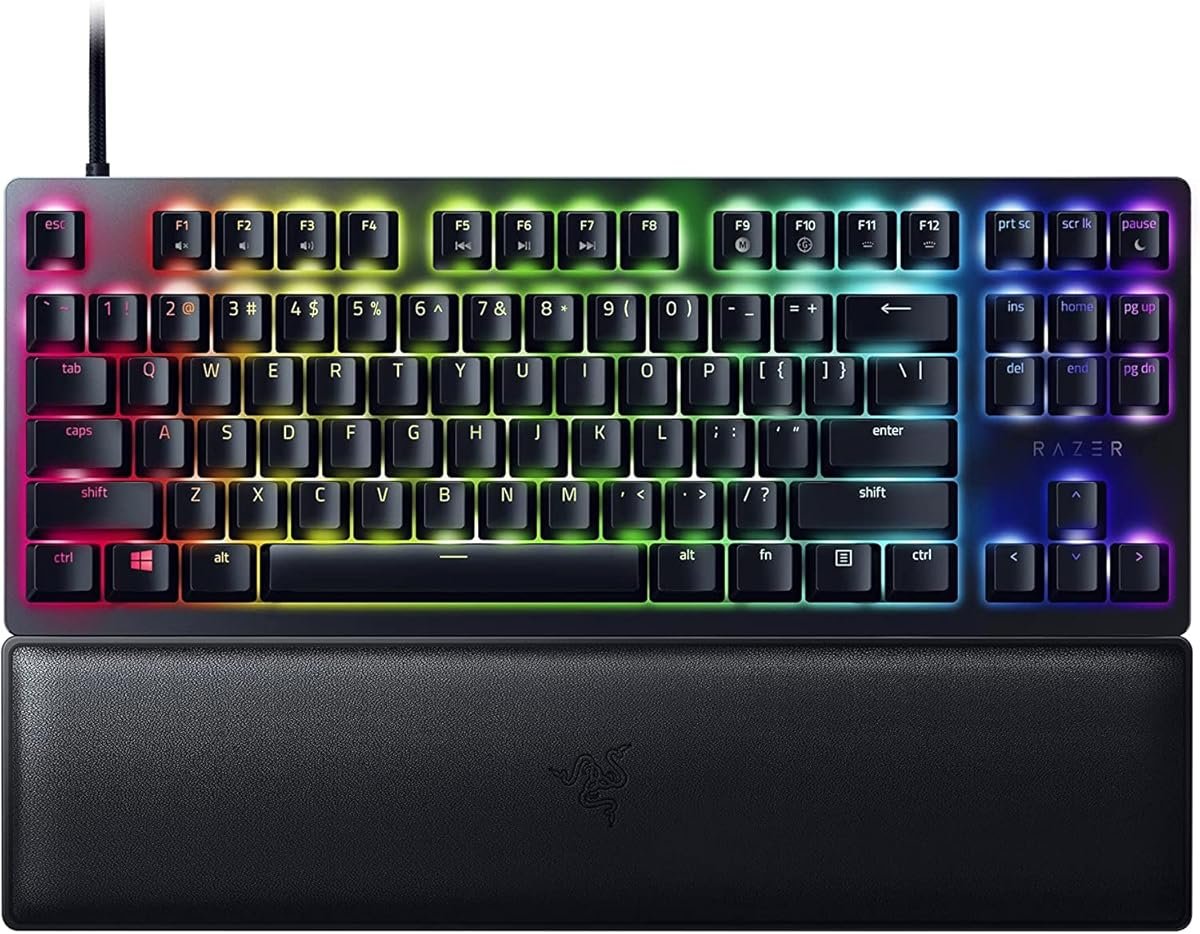
Razer BlackWidow V4 Pro
Full-size, clicky Green switches, and the most “gaming” aesthetic in the category.
4.5/5
(1,900+ global reviews)
This is the keyboard for people who know they want mechanical, want a numpad, and want the typing experience to sound like a mechanical keyboard — not a muffled office board. Razer’s Green switches are clicky, tactile, with a satisfying bump and that classic “click-clack” you hear when a pro streamer is grinding ranked. If you share a room or work from home in a majlis-attached setup, be warned: your family will comment.
The BlackWidow V4 Pro ships with Razer’s Orange switches as the tactile option and Yellow switches as the linear option, but the Greens are what made this line famous. Every switch is factory-lubed, which is a real upgrade over the K8 Pro and the G Pro X. Command dial, dedicated media keys, a pass-through USB port, magnetic wrist rest — this is the most feature-loaded board in the roundup.
The catches: at SAR 1,199 it’s the most expensive; the Razer Synapse software is heavy and annoying; and the RGB underglow is either incredible or an Eid-light-display eyesore depending on your taste. If you want a full-size board that feels like an expensive typewriter and don’t mind the price, this is it.
- Factory-lubed switches out of the box
- Full-size with dedicated media + dial
- Underglow RGB + per-key lighting
- Doubleshot ABS keycaps, pass-through USB
- SAR 1,199 — the most expensive here
- Razer Synapse software is heavy
- Green switches are loud (housemate warning)
- No hot-swap (switches are soldered)
| Switch Type | Razer Green/Orange/Yellow, soldered, factory-lubed |
| Layout | Full-size (104 keys + media dial) |
| Connection | USB-C with pass-through USB 2.0 |
| Extras | Magnetic wrist rest, Command dial |
| Lighting | Chroma RGB per-key + underglow |
Right for you if: You want a full-size board with numpad, you love the loud clicky typing experience, and you’re building a “full Razer ecosystem” setup. Not right if you live in shared housing — the Greens are genuinely loud.
THE SWITCH GUIDE — IN PLAIN WORDS
Linear (Red, Yellow): Smooth press, no bump, no click. Best for fast-action FPS and double-tapping. The “gaming” default.
Tactile (Brown, Orange): Smooth press with a bump halfway down so you feel the actuation. Best for mixed gaming and typing. The safe middle ground.
Clicky (Blue, Green): Tactile bump + audible click when it actuates. Best for typing-heavy work and people who love the sound. Worst for shared spaces and late-night gaming.
If you don’t know which to pick: Start with Brown. If it feels too “mushy” go Red, if you want more feedback and don’t mind noise go Blue.
Keycap upgrades become tempting fast. Once you own a mechanical board, you’ll want nicer keycaps — a PBT dye-sub set from KPrepublic or similar runs SAR 150–300. Nobody warns you.
Wrist rest is not optional. The G Pro X doesn’t include one; the BlackWidow V4 Pro does; the K8 Pro doesn’t. A proper wooden or memory-foam wrist rest costs SAR 50–150 and protects your tendons over long sessions.
Replacement cables get lost. Detachable USB-C is great until you lose the cable. Keep the original, budget SAR 30–60 for a replacement paracord cable.
Stabilizer lube is the rabbit hole. Factory stabilizers can rattle — lubing them properly costs maybe SAR 40 of lube but 2 hours of time. Or pay someone at a regional keeb shop SAR 100–150 to do it.
Real math for the K8 Pro path: SAR 499 keyboard + SAR 100 wrist rest + SAR 150 PBT upgrade set + SAR 120 extra switches = SAR 869 for the full “enthusiast starter” config.
Things Saudi Gamers Should Know Before Buying
Arabic legends matter. The G Pro X TKL and BlackWidow V4 Pro ship with Latin-only keycaps unless you buy the Middle East variant. The Keychron K8 Pro has an Arabic-layout variant available on Amazon.sa for the same price — worth checking before you order.
Amazon.sa vs noon vs Jarir. Keychron is cheapest direct from Amazon.sa. Logitech and Razer premium boards are often SAR 80–150 cheaper on White Friday and Ramadan sales on noon. Jarir has the keyboards in-stock physically so you can actually feel the switches before buying — worth the trip if you’re near a branch.
Summer and ABS keycaps. Saudi summer + daily-use gaming + ABS keycaps = shine in about 8–12 months. PBT keycaps last 3+ years. The K8 Pro comes with PBT; the other two come with ABS. Factor this in for long-term value.
Mada and STC Pay both work. All three keyboards on Amazon.sa and noon accept Mada and STC Pay. No need for a credit card.
Resale on Haraj. Keychron boards resell at around 60–70% in year one because the community respects them. Logitech and Razer hold at 55–65% but only with the original box. If you think you’ll upgrade, keep everything.
Frequently Asked Questions
Q: Do I really need hot-swap?
If you’re 100% sure which switch type you want, no — hot-swap is overkill. If you’re buying your first mechanical and don’t know, yes — hot-swap is the insurance policy that lets you change your mind without SAR 500 in regret.
Q: Are optical switches real mechanical switches?
Technically no. Optical switches use light to register input instead of metal contact. They feel similar but you can’t swap them for traditional MX-compatible switches. If “mechanical” matters to you for enthusiast reasons, stick with true mechanical switches.
Q: TKL or full-size?
TKL (no numpad) is the gamer default — it frees up desk space for your mouse arm. Full-size makes sense if you spend equal time in Excel or accounting software. If you’re pure gaming, go TKL.
Q: Are clicky switches too loud for shared housing?
Generally yes. If you share a room or work next to someone in the majlis, Blue or Green switches will draw comments within a week. Go tactile (Brown/Orange) for a quieter compromise.
Q: Warranty in Saudi Arabia?
Logitech and Razer both honor 2-year warranties through Amazon.sa and Jarir. Keychron has 1-year but RMA through their regional partner is straightforward. Keep your order email — that’s your proof.
As an Amazon Associate, Kazazone earns from qualifying purchases. When you buy through our links, we may earn a small commission at no extra cost to you. This helps us keep creating honest, independent reviews for Saudi gamers.