Amazon Associates Program Disclosure
As an Amazon Associate, Kazazone earns from qualifying purchases.
Best Streaming Accessories for KSA Creators (2025)
Three accessories that punch far above their price tag. Wallah, most Saudi streamers obsess over GPUs and mics while ignoring the three things that actually separate a “looks like a Twitch partner” stream from a “bro why you so dark” stream: a key light you can control from your phone, a Stream Deck that makes you look like you know what you’re doing mid-stream, and a boom arm that keeps your mic floating where it belongs. We tested Elgato Key Light Air, Elgato Stream Deck MK.2, and Rode PSA1+ against real Riyadh apartment lighting, Amazon.sa pricing, and warranty reality in the Kingdom.
Elgato Key Light Air is the single most underrated upgrade for a Saudi streamer — fixes bad apartment lighting in 10 minutes, app-controlled so you don’t get up mid-stream. Elgato Stream Deck MK.2 is the flex that stops looking like a flex after you use it — scene switching, audio mixing, OBS hotkeys all from 15 physical buttons. Rode PSA1+ is the boom arm I wish I’d bought 3 years ago — internal spring that doesn’t sag, cable management that actually works, built to hold a Shure SM7B if you upgrade later.
Elgato Key Light Air
The Key Light Air is what Elgato’s big Key Light would be if it went on a diet — same edge-lit LED panel, same app control, same color temperature range (2,900–7,000K), but smaller, lighter, and about 300 riyals cheaper. For a Riyadh apartment desk setup where you don’t have infinite space, the Air is honestly the better pick 99% of the time. It outputs 1,400 lumens, which sounds modest on paper but is genuinely bright enough to fix the “I’m sitting in the dark” problem that plagues home streamers.
What makes it click is the Elgato Control Center app — you control brightness and color temperature from your phone, from Stream Deck (if you own one), or from the laptop you’re streaming on. No reaching behind the light to fumble a physical dial while live. Set a cooler 5,600K for daytime, a warmer 4,200K for night streams so you don’t look like a ghost, save both as presets, and switch with one tap. Ya salam — this is the feature nobody tells you about that makes the biggest practical difference.
What to watch out for: the included desk mount is a C-clamp that grips desks 0.6–2 inches thick. If your desk has a thicker edge or a floating top, you’ll need a separate mount or a proper lighting stand (adds 80–150 riyals). Also: one light is enough for a basic talking-head stream, but professional-looking “two-point” lighting needs a key (main) light plus a fill light. Budget for a second Key Light Air down the line if you’re going serious.
- App + Stream Deck control — no mid-stream fumbling
- Edge-lit panel = zero harsh hotspots on your face
- Color temperature 2,900–7,000K covers day and night streams
- 2-year Elgato warranty honored via Amazon.sa
- Desk clamp limited to 0.6–2 inch edges
- One light is rarely enough — plan to buy two
- Requires Wi-Fi 2.4GHz network (not 5GHz only)
| Max brightness | 1,400 lumens |
| Color temperature | 2,900–7,000K adjustable |
| Panel | Edge-lit LED, diffused |
| Control | Wi-Fi 2.4GHz, iOS/Android/Mac/Windows app |
| Warranty | 2 years (Elgato global) |
Elgato Stream Deck MK.2
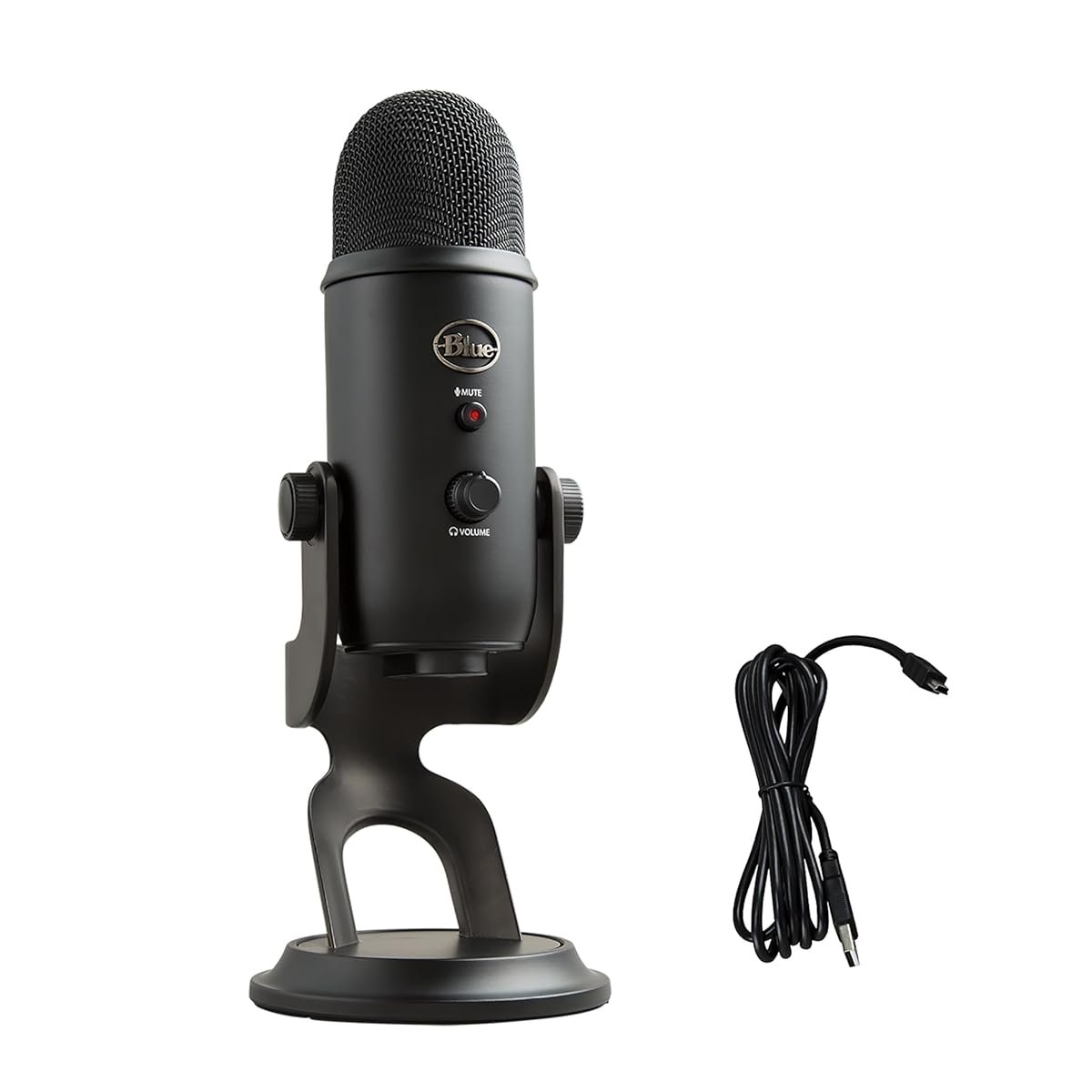
Stream Deck MK.2 is the piece of streaming gear that looks unnecessary until you use one, and then you can’t imagine going back. Fifteen customizable LCD buttons next to your keyboard, each one assigned to whatever you want — switch OBS scenes, mute your mic, trigger a sound effect, pause Spotify, toggle the Key Light, launch a Twitch clip. All the stuff you used to fumble for with keyboard shortcuts or alt-tabbing, now one physical button press away. For KSA streamers specifically, it also means you can pin commonly-used Arabic keyboard layouts or clip-worthy moments with a tap, mid-stream, without breaking flow.
The real win is OBS integration. Stream Deck plugs into OBS (or Streamlabs, or XSplit) natively — scenes, transitions, filters, replay buffer, and dozens of other actions are built-in. No scripting needed, no learning curve beyond dragging actions onto buttons in the Stream Deck desktop app. Add Twitch chat commands, Discord push-to-talk, YouTube clip trigger, and your stream starts looking like a broadcast production instead of someone’s bedroom setup. For content creators in Riyadh and Jeddah who want to go from casual to Twitch Partner-grade, this is the single most impactful purchase.
What to watch out for: 15 buttons sounds like plenty until you start adding profiles for different games, scenes, and chat commands — then you’ll wish you’d gotten the 32-button Stream Deck XL. For most streamers the MK.2 is the right balance; for anyone doing multi-scene professional streams, the XL (SAR 1,099) is the upgrade. The MK.2’s button faces also pick up fingerprints like crazy on the black bezel — minor, but worth knowing if you’re particular.
- 15 programmable LCD buttons — one-tap scene control
- Native OBS, Streamlabs, XSplit integration
- Custom icons — drag-drop your own images/GIFs
- Thousands of free plugins (Discord, Spotify, Twitch, etc.)
- 15 buttons fills up fast for complex streams
- Black bezel shows fingerprints
- Requires Stream Deck desktop app running at all times
- Learning curve for advanced multi-action setups
| Buttons | 15 custom LCD keys |
| Connection | USB-C (cable detachable) |
| Integrations | OBS, Streamlabs, XSplit, Twitch, Discord, Spotify, Philips Hue, and 200+ more |
| Compatibility | Windows 10+, macOS 11+ |
| Warranty | 2 years (Elgato global) |
Rode PSA1+ Professional Studio Boom Arm
The PSA1+ is the upgraded version of Rode’s legendary PSA1 boom arm, and it solves the one thing that used to bother me about the original: sag. Cheap boom arms drift downward over the course of a stream until your mic is in frame or worse, actually touching the desk. The PSA1+ uses an internal spring with stronger tension and dampening, which means you set it once and it stays there — hours, days, weeks. For a streamer doing 4-hour sessions from a Riyadh desk, this alone justifies the price over the SAR 150 random-brand arm on Amazon.sa.
It holds microphones up to 1.2 kg, which covers literally every mainstream streaming mic — Shure SM7B, Shure MV7, Rode NT1, Rode PodMic, Elgato Wave:3, and any HyperX / Blue / Audio-Technica USB mic. The internal cable channel is the other killer feature — your XLR or USB cable runs inside the arm itself, not wrapped around it with zip ties, which means your workspace looks clean on camera and the cable doesn’t get stressed. Wallah, this matters for stream background aesthetics more than people realize.
What to watch out for: installation takes 15–20 minutes the first time, and the desk clamp needs 1.8–6cm desk edge thickness. Most Ikea and Jarir office desks are fine (2–3cm typical). If you have a thick Mamut / custom desk, you may need the optional flange mount (adds 60 riyals). Also: Rode ships the PSA1+ with their own shock mount thread (5/8 inch), which fits almost everything, but some USB mics use 3/8 inch and need an included adapter ring — check the box, it’s there, people lose it.
- Zero sag — internal spring dampening just works
- Holds 1.2kg mic — compatible with Shure SM7B
- Internal cable channel — clean on-camera look
- Built to last — users still have 2018 PSA1s going strong
- 15–20 minute install the first time
- Desk clamp needs 1.8–6cm edge (most desks fine)
- Heavier than budget arms — overkill for a Blue Yeti alone
| Max mic weight | 1.2 kg (2.6 lbs) |
| Reach | 82 cm horizontal, 94 cm vertical |
| Cable management | Internal channel + external clips |
| Mount | Desk clamp (1.8–6cm edge) |
| Warranty | 1 year (Rode global) |
⚠ Hidden Costs Nobody Talks About
- Second Key Light for proper lighting: One light is a “better than nothing” setup. Real two-point lighting wants a key light and a fill light at 45-degree angles. Budget a second Key Light Air eventually — another SAR 699. That’s 1,398 total for lighting done right.
- Lighting stand instead of desk clamp: If your desk is crowded or your edge doesn’t fit the C-clamp, a Neewer or Manfrotto lighting stand runs SAR 120–220 and gives you flexibility to move the light around. Worth it for serious home studios.
- Stream Deck XL upgrade tax: Once you’ve filled 15 buttons (happens faster than you’d think), the jump to Stream Deck XL with 32 buttons costs another SAR 350. Many streamers end up selling the MK.2 used and upgrading within a year.
- Boom arm flange mount for thick desks: Custom or thick desks (Mamut, IKEA Malm) need Rode’s flange mount accessory at SAR 60 because the standard clamp won’t close around 6cm+ edges.
- Real math for a full streaming accessories setup: Key Light Air SAR 699 + Stream Deck MK.2 SAR 749 + Rode PSA1+ SAR 549 + second Key Light SAR 699 + cables/mounts SAR 150 = SAR 2,846 real cost for a polished two-point lit, scene-switchable, boom-arm streaming setup. Build it up over 3–4 months, not all at once.
Things Saudi Buyers Should Actually Know
Wi-Fi reality for Elgato smart lighting. Key Light Air requires a 2.4GHz Wi-Fi network — it won’t connect to 5GHz-only networks, which is how many newer STC and Mobily routers are configured by default. Before you unbox the light, check your router admin panel and make sure the 2.4GHz band is enabled (it almost always is, but some “Wi-Fi 6” routers hide it). If the light won’t pair, 90% of the time this is why. The Elgato Control Center app will tell you this in unhelpful error language; now you know.
Amazon.sa is the right channel for all three. Elgato has official Amazon.sa fulfillment for Key Light Air and Stream Deck MK.2 — warranty claims route through Amazon without painful emails to Elgato’s Taiwan/Germany offices. Rode also has Amazon.sa presence for the PSA1+. Jarir carries Elgato products intermittently at SAR 50–100 markup. Noon is unreliable for this category. Avoid any third-party seller on any platform — counterfeit Stream Decks exist and they’re hilariously bad.
Desk space planning. All three accessories attach to your desk edge. If you already have a monitor arm, a mouse bungee, and a laptop riser, plan the clamp layout before ordering. Rule of thumb: Key Light Air on one front corner, Rode PSA1+ on the opposite front corner, Stream Deck sits on the desk surface next to your keyboard. The Key Light and boom arm clamps need about 15cm of clear desk edge each — measure first.
Power draw and UPS sizing. Key Light Air is surprisingly efficient — 17W at full brightness. Two lights + Stream Deck + computer pulls maybe 600W total for an average gaming streamer. If you use a UPS (worth it in areas with occasional brownouts), an 850VA UPS covers all of this for 10–15 minutes of runtime — enough to save your stream clip or gracefully end a broadcast if power flickers. APC Back-UPS 850VA runs SAR 600–700 on Amazon.sa.
Payment methods. Mada, STC Pay, Apple Pay all work on Amazon.sa for streaming accessories. Tabby and Tamara support 4-payment splits, which is useful if you’re building your setup piece by piece — you can spread each purchase across four installments without interest. Sensible way to stagger building a proper stream setup over a couple months instead of dropping 2,000+ at once.
FAQ
If I can only afford one of these, which should I buy first?
Key Light Air. Bad lighting is the single most visible quality gap in a home stream, and the fix is one purchase. Stream Deck is a workflow upgrade that pays off over months; boom arm solves a physical problem that only matters if your current mic is in your way. Lighting first, always.
Does the Key Light Air work without a Stream Deck?
Yes — it’s fully controlled via the Elgato Control Center app on iOS, Android, Mac, and Windows. Stream Deck integration is a bonus, not a requirement. You can use the app as a permanent widget on your phone next to your keyboard and it works great.
Can I use Stream Deck for non-streaming stuff like work?
Absolutely, and many users do. Video calls on Teams/Zoom, Spotify controls, Notion shortcuts, Photoshop actions, code shortcuts in VSCode — all scriptable. Plenty of KSA freelancers and managers use Stream Deck for productivity, not streaming. It’s the Swiss Army knife of keyboard accessories.
Will the Rode PSA1+ fit any mic?
Any mic up to 1.2kg. That covers: Shure SM7B, MV7, SM58; Rode NT1, PodMic, NT-USB; Elgato Wave:1/3/XLR; HyperX QuadCast, SoloCast; Blue Yeti, Yeti Nano; Audio-Technica AT2020, AT2035. Thread is 5/8 inch with a 3/8 inch adapter ring included for smaller threads. Basically if your mic isn’t a full broadcast studio condenser, it fits.
Does Key Light Air produce heat that will cook my face?
No. LEDs run cool. You’ll feel a gentle warmth within 20cm of the panel but nothing uncomfortable, even during long summer sessions in Jeddah where your AC is already working overtime. It won’t add meaningfully to your room temperature.
I’m a Mac user — do all three work on macOS?
Yes. Key Light Air has a native macOS app. Stream Deck runs on macOS 11+ (Big Sur and later). Rode PSA1+ is hardware — no drivers, no compatibility issue. All three are fully Mac-friendly.
Kazazone participates in the Amazon Services LLC Associates Program. We earn a small commission when you buy through our links, at no extra cost to you. Prices and availability verified on Amazon.sa at time of publication; they can change. We’ve personally used these accessories in live streams from Riyadh home setups over multi-month periods.