Amazon Associates Program Disclosure
As an Amazon Associate, Kazazone earns from qualifying purchases.
It’s 2 AM and you’re one elimination away from Victory Royale. Your thumb flies to crouch, your fingers hit the strafe keys—and the enemy drops you mid-peek. You blame lag. You blame your aim. You don’t blame the SAR 79 membrane keyboard that skipped your input. Sound familiar?
Every Saudi gamer hits this crossroads eventually. Mechanical or membrane? One costs three times more and sounds like a typewriter convention. The other is silent, cheap, and probably the reason you’re stuck in Silver. Let’s settle it properly—with actual numbers, real scenarios, and zero brand loyalty.
Mechanical vs Membrane Keyboard for Gaming — The KSA Honest Breakdown (2025)
Walk into any Jarir or open any Amazon.sa gaming tab and the pricing is almost insulting. A “gaming” membrane keyboard: SAR 120. A “pro” mechanical: SAR 600+. Same job, right? Wrong. The gap between these two technologies is bigger than the price tag suggests—but not always in the direction the marketing wants you to believe. We tested both as daily drivers through a Riyadh summer, on ranked Valorant nights with the group chat, and through 8-hour work-from-home shifts. Here’s what actually matters for Saudi gamers before you tap “buy.”
Kazazone Verdict: If you play competitive shooters, MOBAs, or fighting games—or you type more than 4 hours a day—go mechanical. Full stop. The SAR 150 premium pays itself back in the first year through durability alone. If you’re a casual gamer, play mostly story-driven single-player, share a room with a sleeping sibling, or game from a majlis where noise isn’t welcome—a good membrane keyboard is genuinely fine. Neither choice is wrong. One just fits your life better.
Head-to-Head Comparison
| Spec | Mechanical | Membrane |
| Price (KSA) | SAR 250–700+ | SAR 80–250 |
| Lifespan | 50–100 million keystrokes | 5–10 million keystrokes |
| Actuation Force | 45–80g (switch-dependent) | 55–65g (mushy response) |
| Response Time | ~5ms (tactile register) | ~15ms (bottom-out only) |
| N-Key Rollover | Full NKRO (all keys register) | 2–6 keys typical |
| Noise Level | Loud to moderate (switch-dependent) | Near-silent |
| Repairability | Hot-swap switches, keycaps swap | Replace the whole thing |
Quick take: If the family sleeps when you game—or your gaming chair lives in the majlis—membrane wins by default regardless of what Reddit says. Respect the household first. Skill matters less than your mother’s sleep schedule.
The Hidden Costs Nobody Warns Saudi Gamers About
SAR 349 or SAR 199 is the sticker. Here’s what the unboxing videos leave out:
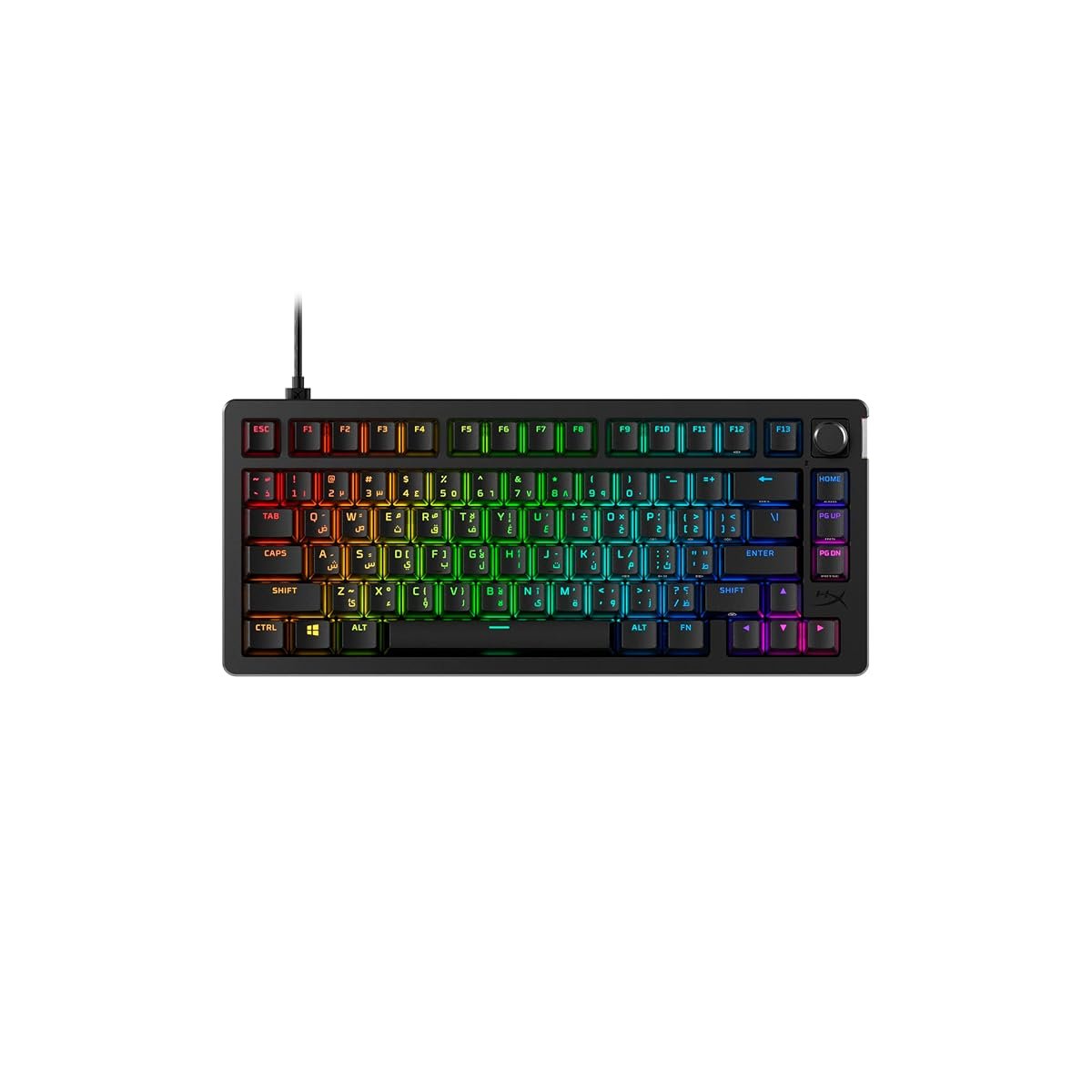
- Keycaps upgrade (mechanical only) — the stock keycaps on the HyperX are ABS plastic and will shine up and go glossy in 8–12 months of daily use. PBT keycap sets run SAR 120–250.
- A proper wrist rest — taller mechanical keyboards wreck your wrist without one. Foam or gel: SAR 40–80.
- Batteries for the membrane — two AA’s every 24 months. Negligible, but real over 5 years.
- Dust and Saudi dust in particular — mechanical switches let dust in between keys and need air-blowing every 2–3 months. A compressed air can: SAR 35.
- The upgrade itch — once you go mechanical, you’ll want to try hot-swap boards, different switches, custom keycaps. Budget SAR 200 a year for this hobby or you’ll resent it.
Real math: a mechanical keyboard setup over 5 years = SAR 349 + SAR 180 (keycaps) + SAR 60 (wrist rest) + SAR 175 (5 years of cleaning supplies) = ~SAR 765. Five years of membrane keyboards at 2-year replacement cycles = SAR 199 x 2.5 = ~SAR 500. The real gap is SAR 265 over five years—not SAR 150 on day one. Still a win for mechanical if you use it seriously.
So Which One Should YOU Buy?
Choose Mechanical if you…
- 🎮 Play ranked Valorant, CS2, Apex, or fighting games
- 🎮 Type more than 4 hours a day (students, devs, writers)
- 🎮 Have your own room or use headphones
- 🎮 Want something that lasts 10+ years
- 🎮 Enjoy customizing keycaps and switches
Choose Membrane if you…
- 🎮 Share a room or live in a quiet household
- 🎮 Play casual games or FIFA with friends
- 🎮 Game from the majlis or shared living space
- 🎮 Have a strict SAR 200 budget
- 🎮 Prefer wireless and slim keyboards
Things Saudi Gamers Should Know Before Buying
Availability in KSA: Both keyboards ship fast from Amazon.sa to Riyadh, Jeddah, and Dammam with next-day or 2-day delivery. Jarir also stocks HyperX and Logitech in-store if you want to feel the keys before buying—which, genuinely, is the best advice for a keyboard purchase. Feel the switches first if you can.
Arabic layout reality: This is the one thing no global review covers. Most keyboards sold in KSA now come with dual-print Arabic-English keycaps—both the HyperX and the Logitech. Confirm before you buy; a few imports ship English-only and you’ll be stuck. If you type Arabic often, dual-print is non-negotiable.
Saudi summer + mechanical keyboards: The oil in some switches (especially cheap clones) can get tacky in 40°C+ heat, making keys stick. Stick to Cherry MX, Gateron, or Kailh Box switches—they handle the heat fine. Avoid no-name Chinese switches in your first mechanical. The HyperX above uses real Cherry—no issue.
Warranty in KSA: HyperX offers a 2-year warranty through their regional distributor; Logitech offers 3 years on most peripherals. Both honor replacement if you buy through Amazon.sa or an authorized retailer. Grey-market imports from other Gulf countries sometimes don’t—the extra SAR 30 on Amazon.sa is worth it for the paperwork alone.
Resale value: Mechanical keyboards hold resale value surprisingly well on Haraj and Facebook Marketplace—expect to recover 50–70% of your SAR 349 after 2 years if you keep the box. Membrane keyboards? Basically SAR 0 on the used market. Nobody wants a used membrane.
Frequently Asked Questions
Are mechanical keyboards really louder than membrane?
Yes—significantly. Even the quietest linear switches (Cherry MX Red, Gateron Yellow) produce a distinct bottom-out sound that’s 2–3x louder than a membrane keyboard. If noise is a dealbreaker, look for “silent” mechanical switches (Cherry MX Silent Red) or just go membrane. Don’t fight physics.
Will a mechanical keyboard actually make me better at Valorant or CS2?
Directly? Marginally. The ~10ms response difference and full N-key rollover eliminate missed inputs in tight moments—useful, but not a skill substitute. Indirectly? Yes, because you’ll stop blaming your gear and start actually practicing aim. Psychological, but real.
Can I get an Arabic-layout mechanical keyboard in KSA?
Yes. Most mainstream brands (HyperX, Logitech, Razer, Corsair) sell dual-print Arabic-English keycap versions through Amazon.sa and Jarir. Check the product listing for “Arabic layout” or “Arabic-English.” For custom builds, you can order PBT Arabic keycap sets separately for about SAR 150–250.
How long do mechanical switches actually last in Saudi conditions?
Cherry and Gateron switches are rated for 50–100 million keystrokes and handle 40°C+ summers fine if kept out of direct sunlight. Real-world testing: expect 8–12 years of heavy daily use. Dust is your actual enemy—blow out the board every 2–3 months with compressed air and you’ll never have switch issues.
Is a SAR 100 “gaming” keyboard from Amazon.sa worth it?
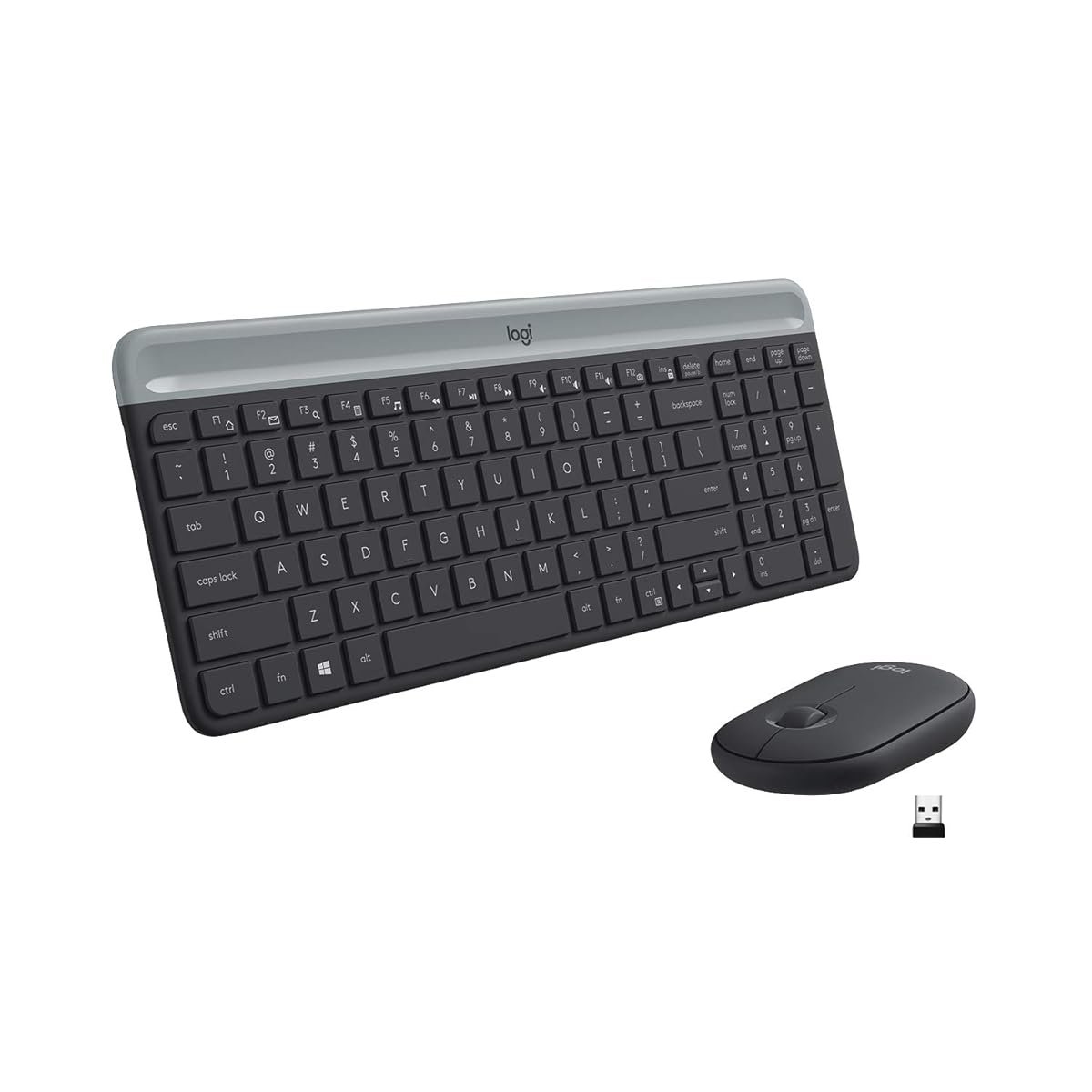
Honestly? No. Anything branded “gaming” under SAR 150 is a membrane keyboard with RGB lights slapped on it—same mushy feel, same missed inputs, just flashier. Either buy a real membrane like the Logitech MK470 for SAR 199, or save up another few weeks and go mechanical. The SAR 100 “gaming” tier is marketing.
As an Amazon Associate, Kazazone earns from qualifying purchases. When you buy through our links, we may earn a small commission at no extra cost to you. This helps us keep creating honest, independent reviews for Saudi gamers.

2 Responses